Astro.js vs Jekyll: A Detailed Comparison

January 31, 2025 · 5 min read

Astro.js and Jekyll have become two popular options for static site generators in recent years. Both tools offer unique features and benefits, catering to different needs and preferences. In this article, we’ll dive deep into both technologies, comparing their functionalities, use cases, and overall performance to help you decide which one is right for your next project. You can also read two other posts where we compare Astro with Next.js and compare Astro with Nuxt.

What is Astro.js?
Astro.js is a modern static site generator designed to optimize performance and enhance the developer experience. It allows developers to build fast, content-focused websites using a component-based architecture. With Astro, you can use various front-end frameworks like React, Vue, and Svelte within the same project.
Key Features of Astro
Partial Hydration: Astro only hydrates components when needed, significantly reducing JavaScript overhead and improving performance.
Framework Agnostic: You can mix and match components from different frameworks within a single project, giving developers flexibility.
Markdown Support: Astro natively supports Markdown files, making it an excellent choice for content-heavy sites like blogs and documentation.
Zero JavaScript by Default: Astro strips away unnecessary JavaScript, resulting in faster load times and better performance.
Use Cases for Astro
Astro is ideal for:
Content-driven websites (blogs, documentation, marketing sites).
Static sites where performance is critical.
Projects that require flexibility in using multiple front-end frameworks.

What is Jekyll?
Jekyll is a popular static site generator that powers GitHub Pages. It’s known for its simplicity and ease of use, making it a favorite among bloggers and developers who want to create personal or project websites quickly. Jekyll converts plain text files into static websites and supports Markdown for content creation.
Key Features of Jekyll
GitHub Integration: Seamlessly deploy your site on GitHub Pages with minimal setup.
Liquid Templating Language: Use Liquid templates to create dynamic content.
Customizable Themes: Choose from a variety of themes or create your own for a unique look.
Built-in Blogging Features: Perfect for bloggers with built-in support for posts, drafts, and categories.
Use Cases for Jekyll
Jekyll is ideal for:
Personal blogs or portfolios (where quick setup is essential).
Projects hosted on GitHub Pages
Users who prefer simplicity over complex configurations.
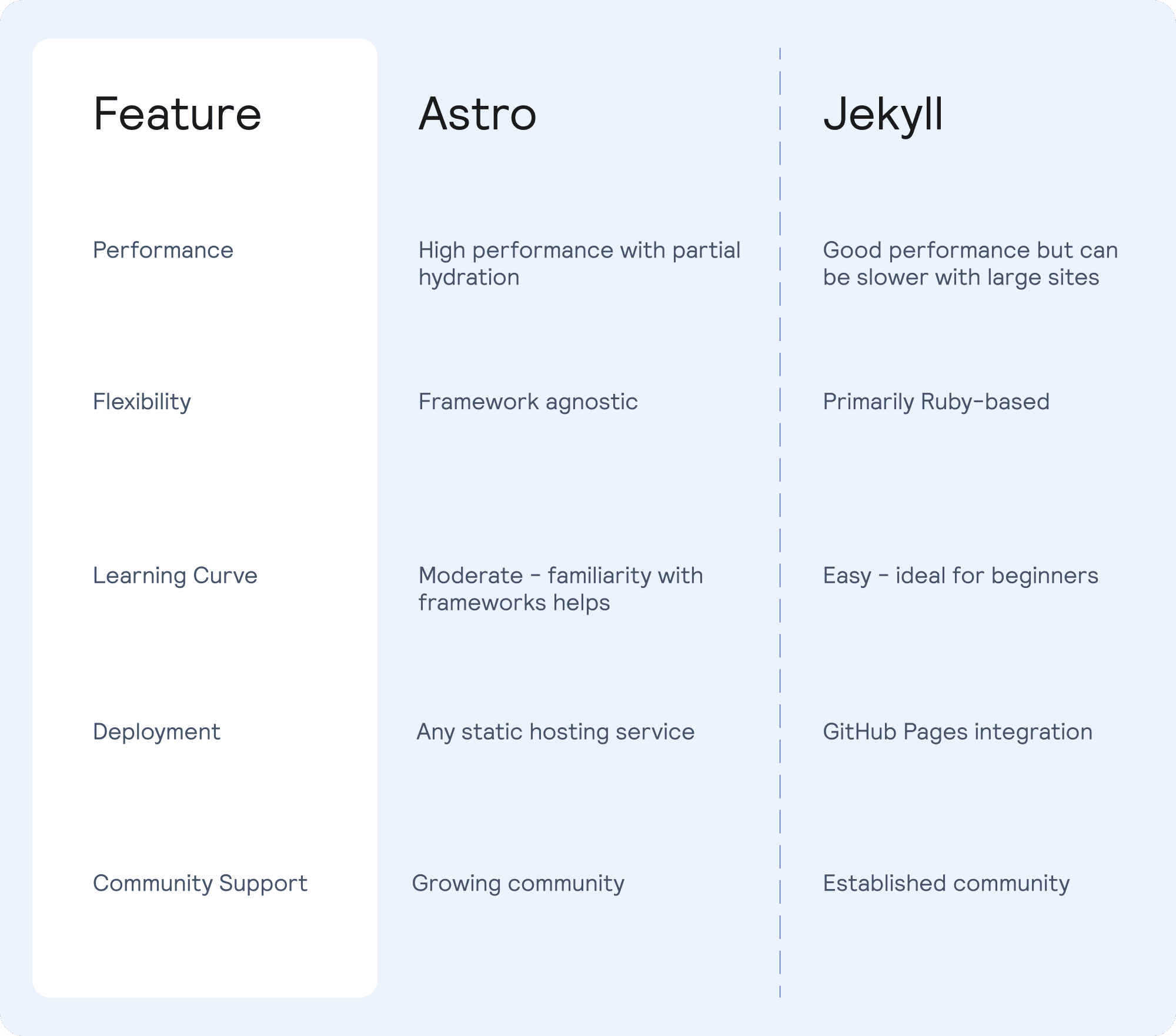
Comparing the features of Astro.js vs Jekyll
Feature | Astro.js | Jekyll |
|---|---|---|
Performance | High performance with partial hydration | Good performance but can be slower with large sites |
Flexibility | Framework agnostic | Primarily Ruby-based |
Learning Curve | Moderate - familiarity with frameworks helps | Easy - ideal for beginners |
Deployment | Any static hosting service | GitHub Pages integration |
Community Support | Growing community | Established community |
Performance Analysis
Astro.js Performance Insights
Astro.js shines when it comes to performance due to its unique approach to hydration. By only loading JavaScript when necessary, it significantly reduces the amount of data transferred and speeds up page load times. This makes it an excellent choice for projects where performance is critical.
Jekyll Performance Insights
Jekyll performs well for smaller sites but may struggle with larger projects due to its reliance on Ruby processing. However, it remains a solid choice for blogs or personal sites where speed is not as critical.

Ease of Use
User Experience with Astro.js
Astro.js offers a modern development experience with its component-based architecture. Developers familiar with frameworks like React or Vue will find it intuitive. The documentation is clear and comprehensive, making it easier to get started.
User Experience with Jekyll
Jekyll’s simplicity is one of its biggest selling points. Its straightforward setup process allows users to create a site quickly. The Liquid templating system may take some getting used to, but overall, it’s beginner-friendly.
Deployment Options
Deploying with Astro.js
Astro.js can be deployed on any static hosting platform like Vercel, Netlify, or GitHub Pages. The flexibility allows developers to choose the best hosting solution that fits their needs.
Deploying with Jekyll
Jekyll integrates seamlessly with GitHub Pages, making deployment straightforward for users already familiar with GitHub. You can also deploy Jekyll sites on other platforms like Netlify or AWS.

Community and Ecosystem
Astro.js Community Growth
While still growing, the Astro community is vibrant and supportive. The ecosystem includes numerous plugins and integrations that enhance functionality and ease of use.
Jekyll Community Stability
Jekyll has an established community with extensive resources available online. Countless themes, plugins, and tutorials can help users maximize their experience.
Conclusion
Choosing between Astro.js and Jekyll ultimately comes down to your specific needs as a developer or content creator. If you prioritize performance and flexibility while working with various frameworks, Astro.js may be the better option for you. On the other hand, if you’re looking for simplicity and easy integration with GitHub Pages, Jekyll could be your go-to choice. Both technologies have their strengths and cater to different audiences.

FAQs
1. Can I use Astro.js without any front-end framework?
Yes, Astro.js supports various frameworks, and you can also build sites purely using HTML and Markdown.
2. Is Jekyll suitable for large-scale websites?
While Jekyll can handle larger sites, performance might decline as complexity increases compared to more modern solutions like Astro.js.
3. How do I deploy an Astro.js site?
You can deploy an Astro.js site on any static hosting service like Netlify or Vercel by following their deployment guides.
4. Does Jekyll support custom themes?
Jekyll allows you to create custom themes or choose from many pre-built options available in the community.
5. Which technology has better SEO capabilities?
Both Astro.js and Jekyll are capable of generating SEO-friendly static sites; however, Astro’s focus on performance may give it an edge in terms of speed-related SEO factors.
Bring Your Ideas to Life 🚀
If you need help with a project let’s get in touch.
Lucky Media is proud to be recognized as a leading software development agency!
Technologies
Stay up-to-date
Be updated with all news, products and tips we share!
