Why do we prefer Statamic over WordPress?

January 4, 2022 · 3 min read

Statamic vs WordPress for modern websites
WordPress is a popular choice for beginners in website building. It’s user-friendly and affordable. But as your site gets bigger, you might have trouble with plugins that clash or break after updates, leading to unexpected issues and extra costs.
If you need more advanced features and dependability, WordPress might not be the right choice. This has made many developers look for other options. We even thought about making our own content management system (CMS) with Laravel before we found Statamic. Now, we often help clients migrate websites from WordPress to Statamic because it has a lot of benefits.
What is Statamic CMS
Statamic is a flexible CMS that fits for all kinds of projects. It offers a free version for basic sites and a Pro version for $275 per project, which includes advanced features like:
Multilingual support
Unlimited user accounts
Git integration for version control
A highly customizable control panel
You can try the Official Statamic DEMO to see how it works.
Statamic is different because it uses a flat-file system, saving data in markdown files instead of a database. This means you don’t have to back up as often and don’t have to worry as much about database security. If you need to, it’s also easy to combine it with a database.
Lucky Media is a certified Statamic agency handling WordPress-to-Statamic migrations
Key benefits of choosing Statamic
Speed: Loads fast since it doesn’t rely on database queries.
Security: Reduces risks by avoiding database vulnerabilities.
Version Control: Know who made changes and when with Git.
Teamwork Made Simple: Collaborate without migration hassles.
Customization: Tailor the Control Panel to your needs.
Building websites with Statamic
Statamic is built on Laravel, a popular PHP framework, making it easy to add custom features. It uses Tailwind CSS for design flexibility and Antlers for templating, which is great if you know Blade or Twig. Its detailed documentation and easier learning curve help make building professional websites smoother than using WordPress.
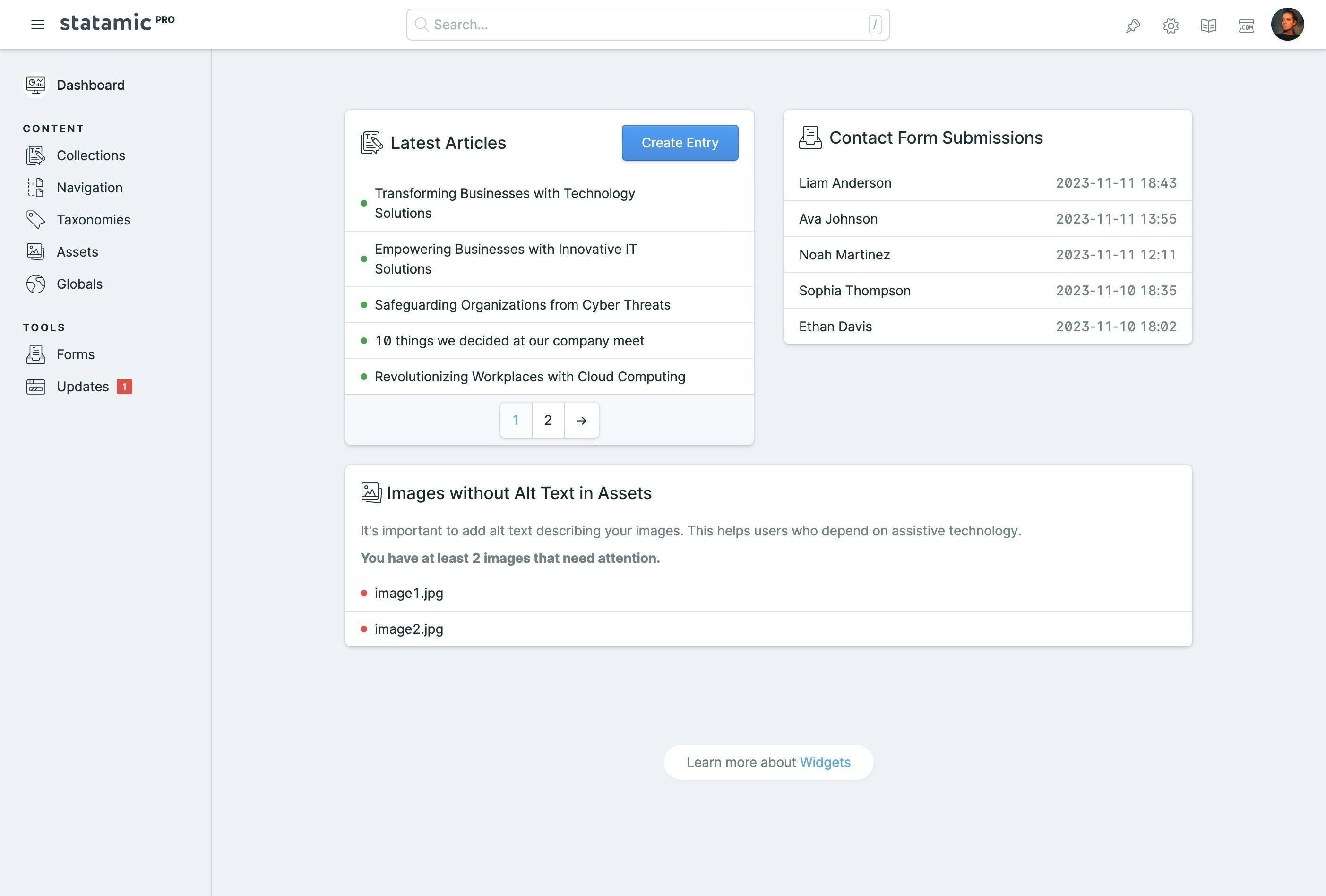
Clients can use reusable parts to build new pages and keep a consistent style, giving them more freedom to be creative. The Control Panel is easy to use and the overall system efficiency has exceeded our expectations. Below is a screenshot showing how clients can update content easily without messing up the design.

Contributing to the Statamic marketplace
We’ve developed some professional Statamic Starter Kits, perfect for quickly setting up personal sites, SaaS, or blogs. Just add your logo, pick the design parts you like, and write your content.
Landtamic and Landtamic Pro - the most popular paid starter kits, featuring 100 design components and lots of great features.
Formatic - a powerful self-hosted form builder.
Milano - easily build e-commerce websites and start selling immediately.
We have also built other starter kits such as Real Estate, Cloud, Gradiente, and Résumé.
Make sure your site is ready for the future with our addon SeoChecker, which gives you SEO tips to improve your site’s performance and impact.
Conclusion
We choose Statamic for its speed, security, and simplicity. It’s perfect for those seeking a modern, reliable CMS. Our clients are always impressed with the results after moving from WordPress to Statamic.
This article is part of the "Which technologies do we use and why?" series where we explain the technologies that we use daily.
FAQs
Why should I migrate from WordPress to Statamic?
Migrating from WordPress to Statamic can offer several benefits, including improved site speed, enhanced security due to a flat-file system, and simplified content management. Statamic’s flexibility and performance can potentially boost your SEO efforts.
Will migrating from WordPress to Statamic affect my SEO rankings?
While migrating to Statamic can improve your site’s performance, it’s important to handle the migration carefully to avoid SEO issues. URL structures should be maintained, redirects should be set up, and meta tags should be preserved. This will help maintain your SEO rankings.
How do I migrate my WordPress site to Statamic?
Migrating involves several steps: exporting content from WordPress, setting up Statamic, and importing content. Use tools or plugins to automate the process, and ensure all data, including images and metadata, is transferred accurately. We have written a detailed case study on migrating a website.
What are the SEO considerations during WordPress to Statamic migration?
Key SEO considerations include preserving URL structures, setting up 301 redirects for changed URLs, maintaining meta tags and titles, and keeping content integrity. Also, use Statamic’s SEO plugins to improve your site’s optimization.
Will I lose content during the migration?
With careful planning, you shouldn’t lose content. Use migration tools to transfer data correctly and make sure that all content, like pictures and details, is still there after the move. We’ve written a detailed case study on migrating a website.
What SEO plugins are available for Statamic?
Statamic offers various SEO plugins that can help maintain and improve your site’s SEO. These plugins can assist with meta tags, sitemap generation, and more.
Where can I find support if I encounter issues during migration?
Statamic has a helpful community and support forums where you can get help and resources. Talk to the community to solve any problems during your migration. If you’re having trouble with the migration and need help, feel free to contact us.
Build Your Statamic Project with the #1 Statamic Agency
Lucky Media is a certified Statamic agency. We handle WordPress-to-Statamic migrations end-to-end and have been building on Statamic since early versions.
Technologies
Stay up-to-date
Be updated with all news, products and tips we share!
